Transform Your Healthcare Presentations with a Professional Template
Standing out in the healthcare industry requires more than just solid data and research; it demands a visual language that speaks of trust, clarity, and innovation. Whether you are a medical professional presenting a case study, a startup pitching a new health-tech solution to investors, or an administrator outlining hospital protocols, the slides you present are a direct reflection of your competence. A generic, cluttered presentation can undermine even the most groundbreaking medical findings. This is where a specialized Healthcare PowerPoint Template becomes an indispensable tool, bridging the gap between complex information and engaging visual storytelling.
The Anatomy of an Effective Medical Presentation
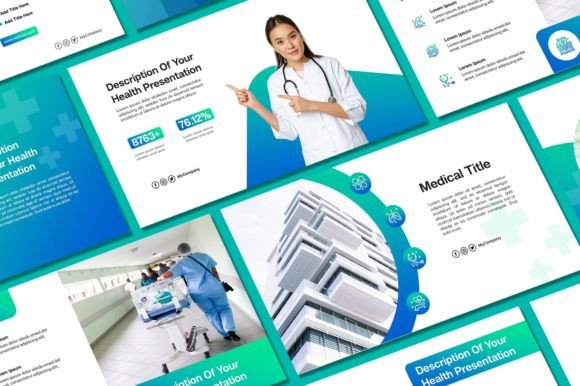
Visual appeal in the medical field is distinct from other industries. It isn't about flashy gradients or abstract art; it is about modern typography, clean layouts, and a color palette that evokes safety and vitality. A well-designed Healthcare PowerPoint Template typically utilizes a mix of sans serif fonts for readability and serif fonts for headings to establish hierarchy. The psychological impact of these choices is profound. When an audience sees a cohesive brand identity immediately, they are more likely to trust the data being presented.
The visual characteristics of a premium medical template often include ample white space to prevent cognitive overload. In a field where precision is paramount, cluttered slides can lead to confusion. By using a template with pre-designed charts, diagrams, and icon sets, you ensure that your editorial design remains consistent. This consistency is crucial for brand recognition. If you are a clinic or a pharmaceutical company, your marketing assets need to look the same whether they are on a screen in a boardroom or printed as a handout.
Practical Applications Beyond the Clinic
While the name suggests a focus on hospitals, the utility of a robust template system extends far beyond clinical settings. For small business owners and entrepreneurs in the wellness sector, the applications are limitless. Consider the following real-world scenarios where a high-quality template saves time and elevates quality:
- Investor Pitches: Health-tech startups need professional presentation skills to secure funding. A template ensures your financial projections and product roadmaps look as polished as your technology.
- Internal Training: Creating training manuals for staff requires readability. Using a template with consistent font pairings helps new employees absorb information faster without straining their eyes.
- Patient Education: Doctors and nutritionists can use these slides to explain complex procedures or diet plans to patients. Simple graphics and clear text improve audience engagement.
- Conference Keynotes: Standing on stage requires a backdrop that commands attention. The right typeface size and slide transitions can make the difference between a forgettable talk and a memorable one.
Furthermore, the design elements included in a comprehensive package—such as the 400+ free icons mentioned in the Sky Creation package—are not just decorative. They are functional tools for visual communication. A heart icon, a DNA strand, or a stethoscope graphic can instantly convey meaning without the need for paragraphs of text. This aligns perfectly with the principles of web design and social media graphics, where quick visual cues are essential for capturing attention.
Mastering Typography and Design Assets
One of the most common mistakes in presentation design is the misuse of typography. A Healthcare PowerPoint Template usually comes with curated font styles that are licensed for commercial use, saving you the headache of legal compliance. However, understanding how to use them is key to visual consistency.
When you download a template, you often receive a mix of premium fonts—perhaps a bold display font for impact and a clean sans-serif for body text. The rule of thumb is to limit yourself to two or three typefaces per project. If you are customizing the template for a client, ensure that the creative font choices align with the client's existing logo design. For instance, if their logo uses a rounded sans-serif, avoid pairing it with a sharp, gothic serif style on your slides.
Readability is the cornerstone of editorial design. When editing your template, pay close attention to line spacing (leading) and letter spacing (tracking). Medical texts can be dense; giving the letters room to breathe makes the content feel less intimidating. Additionally, consider the contrast between the text and the background. While a light grey text on a white background might look "aesthetic," it fails the practical test of a brightly lit conference room. Always prioritize accessibility in your packaging design of information.
Customization: Making the Template Your Own
A template is a starting point, not a finished product. The true value of a system like the one offered by Sky Creation lies in its editability. You have the freedom to adjust background colors, swap out demo pictures for high-resolution images of your own facility, and integrate your specific branding colors.
Think of the template as a chassis for a car. The engine and paint job are up to you. When selecting images, ensure they are high-quality and relevant. Stock photos of generic smiling people can sometimes feel inauthentic. Whenever possible, use real photos of your team or products to build trust. This is a strategy often employed in packaging design and merchandise, where authenticity sells.
Color psychology plays a massive role here. While the template might come in standard medical blue or green, you can shift the palette to match your brand identity. Perhaps your brand uses a warm coral to signify a friendly, patient-centric approach, or a deep navy to convey corporate stability. The ability to edit every graphic element ensures that your digital products and presentations remain unique to your organization.
Workflow Efficiency and File Management
For the busy content creator or marketing professional, time is a non-renewable resource. Building a presentation from scratch involves aligning text boxes, sourcing icons, and testing color combinations—a process that can take days. A pre-built Healthcare PowerPoint Template condenses this timeline into hours.
The workflow is straightforward: you download the assets, install the required fonts (a critical step often overlooked), and begin the content replacement process. By having a library of 50 unique slides, you have a solution for almost any scenario, from a simple agenda slide to complex data visualization. This efficiency allows you to focus on the content itself—the research, the strategy, and the narrative—rather than getting bogged down in pixel-pushing.
Moreover, the versatility of these assets extends to other design assets. The icons included in the package, for example, can often be extracted and used in other software. Need an icon for a blog post about heart health? Use the one from your PowerPoint set. Creating a flyer for a community health drive? The vector graphics are scalable and perfect for print. This cross-platform utility makes the initial investment in a high-quality template a smart business decision for any creative entrepreneur.
Final Thoughts on Professionalism
In the end, a presentation is a conversation between you and your audience. A Healthcare PowerPoint Template ensures that this conversation is professional, engaging, and visually coherent. It removes the barriers of design inexperience and allows anyone—from a seasoned surgeon to a student—to communicate with authority. By leveraging these design assets, you are not just making slides; you are building a reputation for excellence and attention to detail in an industry where those traits matter most.